
My Words
🧒 For kids
- Listen to the word.
- Type it with the letters.
- Tap Check. Wrong? Look at the green letters, then tap Next.
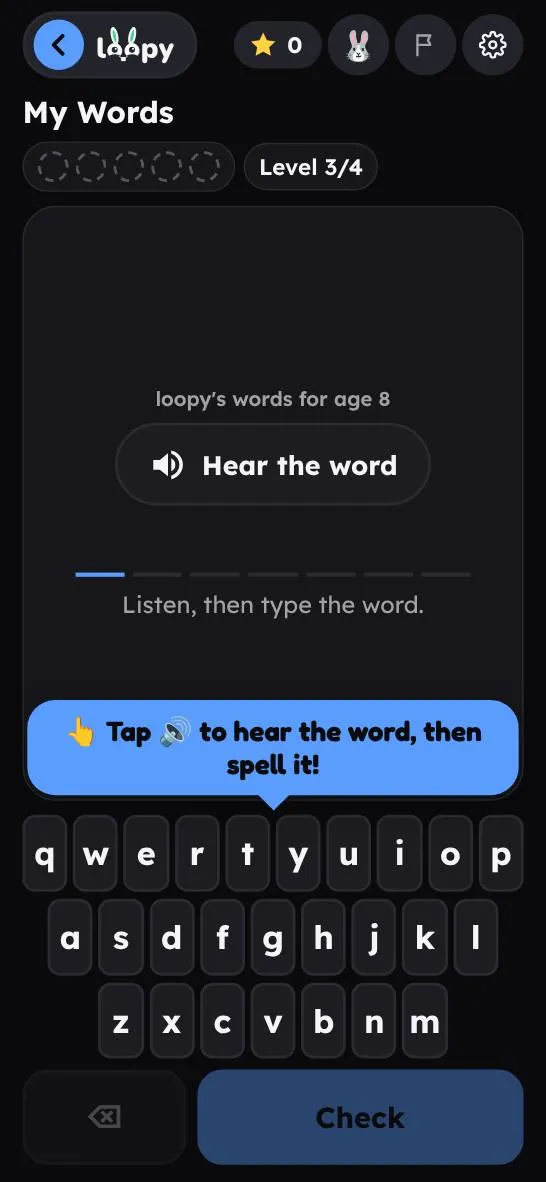
A spelling game for ages 6 to 12, like a spelling test at school. loopy reads a word out loud and the child types it. A grown-up types in the spelling words from school, or imports a CSV file. Without a list, loopy plays its own spelling words for the age.
How to play
Section titled “How to play”- Listen to the word. Tap Hear the word to hear it again. If the word has a sentence, loopy reads that too, and the card shows it with a gap: “My ___ is kind.” If the word has a meaning, it shows in small text under that: “the bee”.
- Type the word with the letter tiles or the keyboard. At levels 1 to 3 there is one box for each letter.
- ⌫ takes back the last letter.
- Tap Check. Right: the boxes turn green and you get a star.
- Wrong: the wrong letters turn red. The right spelling appears under your try, one letter at a time. The line shows it with the tricky part underlined, like “friend”. loopy reads the word once more.
- Tap Next for a new word.
On a keyboard, type the letters, use Backspace to erase and Enter to check.
Your own word list
Section titled “Your own word list”This part is for grown-ups.
- Open ⚙ Settings in the game and find Your word list.
- Type the words, one per line. Or tap Import a CSV file and pick a
.csvor.txtfile from your device. - Tap Save list. The card now says “Your list · 12 words”.
A file or the box can look like this:
word,sentence,meaning
friend,My friend is kind.,Freund
because,I ran because I was late.
said- One word per line. A sentence can follow the word on the same line, after a comma, a semicolon or a tab. It is read aloud with the word and shown with a gap. Up to 50 letters per sentence.
- A meaning can follow the sentence, in a third column. That is the German meaning of an English word, or the English meaning of a German one. It shows in small text under the sentence. Up to 30 letters. loopy never looks a word up anywhere: the meaning comes from your file.
- A meaning can also stand in brackets after the word:
Biene (the bee), Die Biene fliegt zur Blume.The box in Settings shows it that way. - Words with commas between them on one line work too:
friend, because, saidorBiene (the bee), Wiese (the meadow). - A first line like
word,sentence,word,sentence,meaningorword,meaningis a heading and is skipped. It also says what each column holds. A file saved from Excel or Numbers works. Old files with a word and a sentence work as before. - Up to 50 words, each 2 to 20 letters. “don’t”, “ice-cream” and “ice cream” work too.
- The game says what it left out, like numbers or a typing mistake with @.
- Each child has their own list. There is one list for English and one for German: switch Words in to fill the other.
- Every word on the list comes once before any word comes back. A word missed before you loaded the list does not come back in Try again.
- Clear list goes back to loopy’s own words.
- The list stays in this browser. It moves to another device with the stars code. The file is read on your device and never uploaded.
English and German words
Section titled “English and German words”Choose the language in ⚙ Settings under Words in. The voice follows it. Without a list, loopy’s words are the same as in Spelling Quiz: grade 1 words for age 6 and under, up to grade 6 words and up at 11.
German words keep their capital letter: the child types “hund” and the box shows “Hund”. The German keyboard has ä, ö, ü and ß. Every key is the same size. A letter the word needs that is not on the keyboard, like é, joins the last row.
Age levels
Section titled “Age levels”The level sets how much help the child gets. It does not change the words.
| Level | Age | Help |
|---|---|---|
| 1 | 6 and under | Letter tiles: the word’s letters plus a few extra. The first letter shows faintly in its box |
| 2 | 7 | Letter tiles, no first letter |
| 3 | 8 and 9 | A whole keyboard, one box per letter |
| 4 | 10 and up | A whole keyboard, no boxes: the number of letters is a secret |
After 10 right in a row, or 18 of the last 20 right, the game goes up a level by itself. After 3 wrong in the last 5 it offers an easier one. See Levels.
Settings
Section titled “Settings”Tap ⚙ Settings in the game to choose:
- Words in: English or Deutsch. The words follow loopy’s language. Pick the other one to practise it; the pick holds until loopy’s language changes.
- Your word list: see above.
- Level: Letter tiles, first letter shown, Letter tiles, Keyboard or Keyboard, no boxes. These are the four levels above.
- Read aloud: the same pill as in every game, next to the sound button. Here it reads each new word, and it is on at the start. Turn it off and the child taps Hear the word instead. After a miss the word is always read out.
- Meaning under the word: On or Off. On at the start. Shows the meaning from your list, when a word has one.
- Print worksheet: 20 numbered lines to write on, like a spelling test. Under each line is the word’s sentence with its gap, and its meaning when that is on. The words are on page 2, for the grown-up to read out.
The voice is the one built into the device. Nothing is downloaded. If the device has no voice for that language, the Hear the word button hides and the card says so. Then a grown-up reads the word out.
Example help text
Section titled “Example help text”- “Listen, then type the word.”
- “Not quite. It is spelled friend.”
- “Correct! You spelled “because”.”
Something wrong?
Section titled “Something wrong?”Tap the 🚩 flag at the top of the game to tell us. See Report a problem.