

Report a problem
Is a sum wrong? Tap the 🚩 flag. Then ask a grown-up to help.
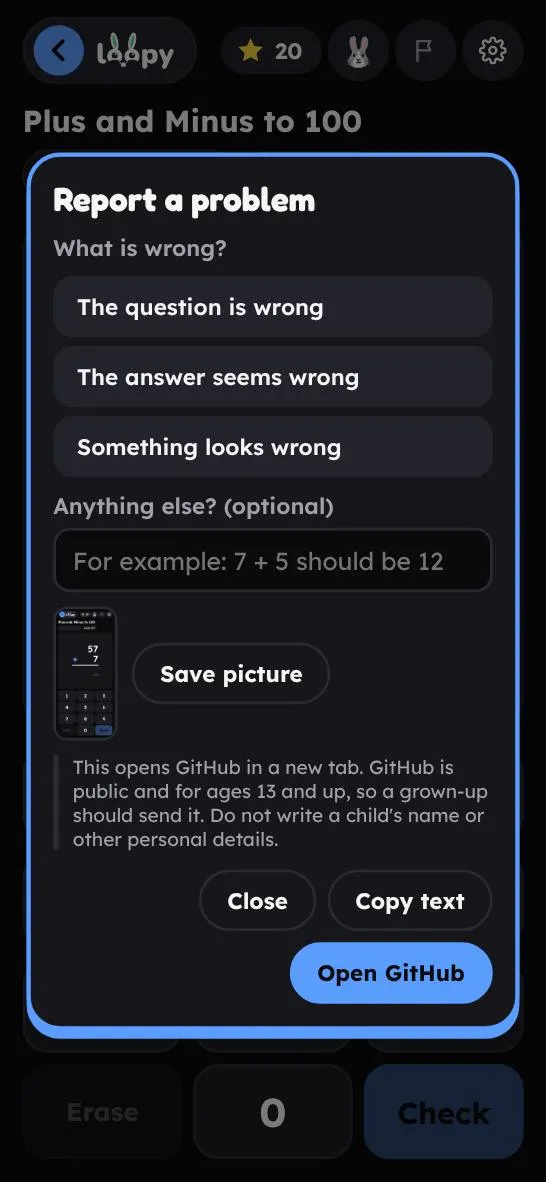
Reports go to loopy’s page on GitHub, a separate website. Everything there is public. GitHub accounts are for ages 13 and up, so a grown-up should send it. Never write a child’s name or other personal details.
The 🚩 flag in a game
Section titled “The 🚩 flag in a game”Every game has a small 🚩 flag at the top, next to ⚙ Settings. On a narrow screen it may hide. Then use Report a problem inside ⚙ Settings. It does the same.
- Tap the 🚩 flag.
- Pick what is wrong: The question is wrong, The answer seems wrong or Something looks wrong.
- Add a note if you like, under “Anything else? (optional)”. For example: “7 + 5 should be 12”.
- loopy makes a picture of the screen. Tap Save picture. Some browsers cannot make it. Then take a screenshot with the device’s buttons.
- Tap Open GitHub. A form opens in a new tab, with the details filled in.
- Add the picture to the form, check it, and send it.
Nothing is sent by itself. Nothing leaves your device until you send the form on GitHub. Copy text copies the details, if you would rather paste them.
The details are: the problem you picked, the game, what was on the screen, the last answer, the age, language, theme, Easier to read, screen size, browser and loopy version. The child’s name is never in it.
The Help page
Section titled “The Help page”Tap the Help button at the bottom of the home page. Under “Tell us what you think” are four links:
- Report a problem: something broken or wrong. It opens a GitHub form.
- Share an idea: a new game, subject or feature.
- Ask a question: something the Help page does not answer.
- See all talks: read what others said.
On GitHub
Section titled “On GitHub”Problems go in GitHub issues. There are two forms:
- Report a game problem: the one the 🚩 flag fills in.
- Report a problem: for anything else. It asks where it happened, what went wrong, the device, the browser and the language.
Ideas and questions go in GitHub Discussions:
A security problem must not go here. See Security.