

Your first minutes
Pick a game. Answer. Get a star for every right answer!
This page walks you through the first 3 minutes with loopy.
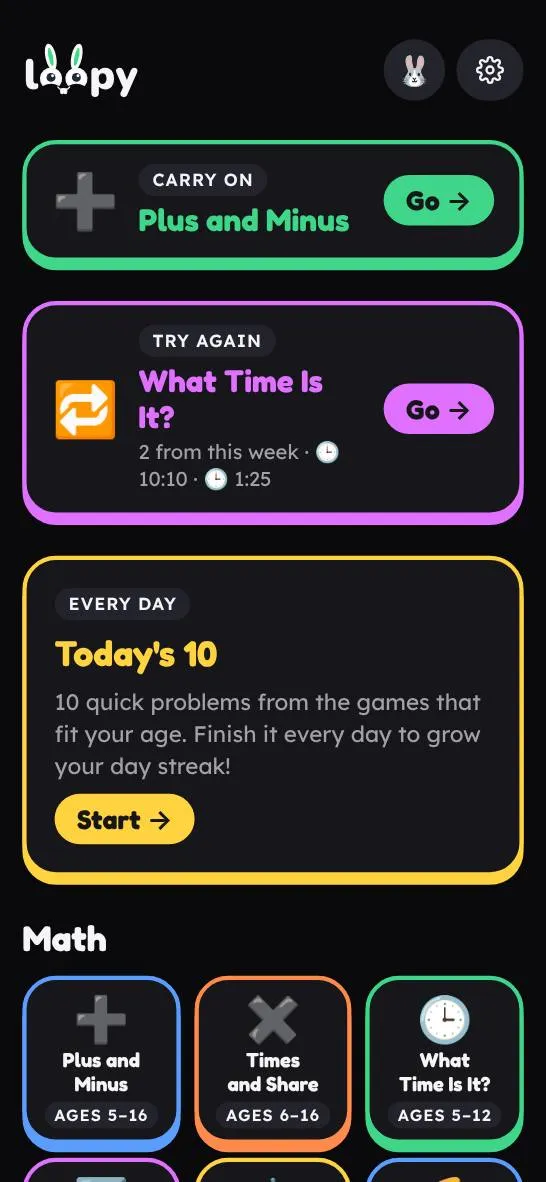
1. Open loopy
Section titled “1. Open loopy”Open the loopy home page in the browser. See Open loopy for the address.
2. Set the age
Section titled “2. Set the age”- Tap ⚙ Settings under “Learn. Play. Repeat.” at the top.
- Tap − or + next to the age until it shows the child’s age.
- Tap ⚙ Settings again to close it.
The games that fit this age now show first. The games for older kids are under For older kids, and for a teenager the easier ones under For younger kids. The age goes up by itself once a year.
3. Pick a game
Section titled “3. Pick a game”Tap a game card. The first time, a blue bubble shows what to tap, like “Tap the numbers, then Check!”.
4. Answer and earn stars
Section titled “4. Answer and earn stars”- Tap an answer, or type it and tap Check.
- The game says Correct! or Not quite., and one line on why.
- Tap Next for a new problem.
Every right answer gives a star. Right answers in a row make a streak 🔥. See Stars and badges.
5. Try Today’s 10
Section titled “5. Try Today’s 10”The yellow Today’s 10 card at the top of the home page gives 10 quick problems from the games for this age. Finish it every day to grow the day streak. See Today’s 10.
Where things are
Section titled “Where things are”- ← loopy at the top left of a game goes back to all games.
- ⚙ Settings is at the top right of every game, and at the top of the home page.
- The stars of the child playing are at the top too, in every game and on the home page. On the home page, tap them to jump to My stars.
- Help is a button at the bottom of the home page.
- Grown-ups is a button at the bottom of the home page too. See Grown-ups page.