

The grown-ups page
This page is for grown-ups. It shows how your games are going.
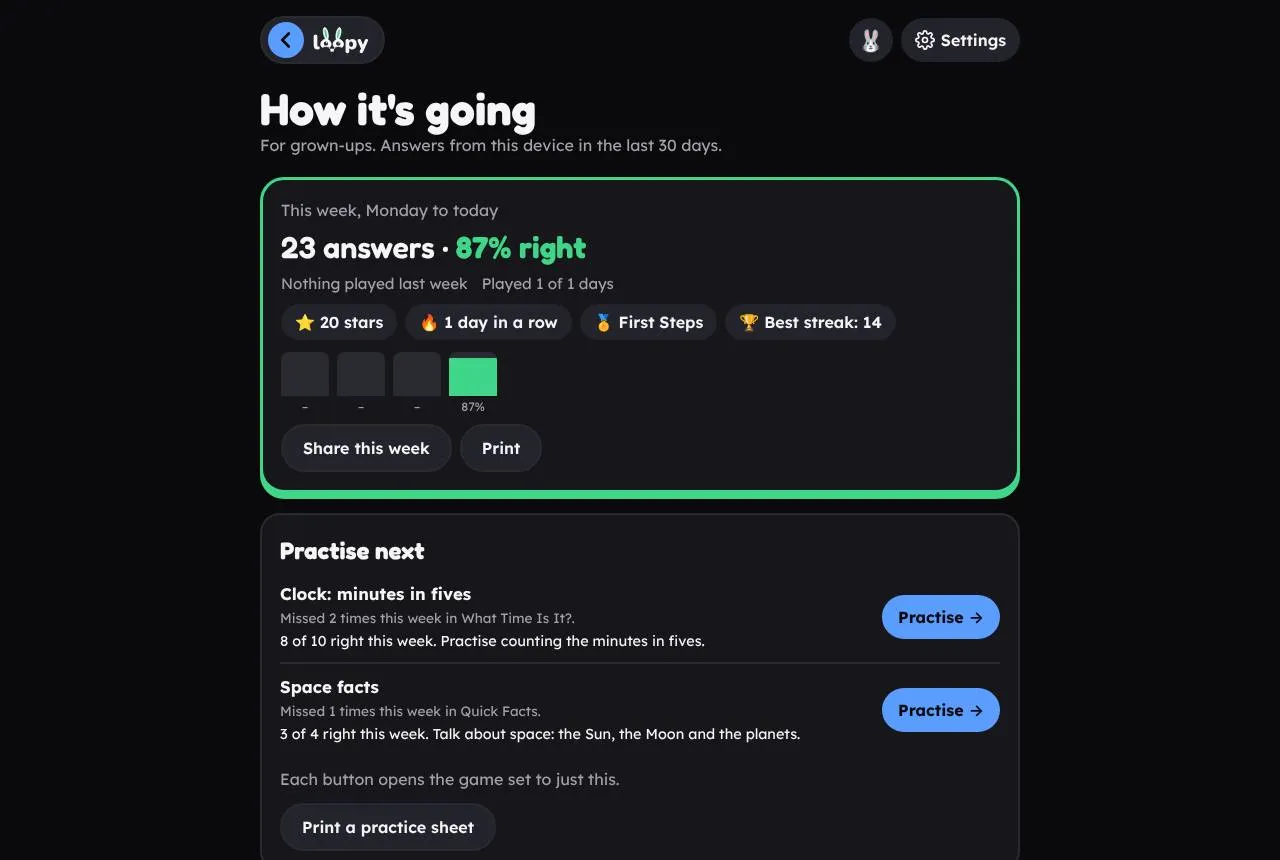
“How it’s going” shows how the week went, what to practise next, and how a child does in each game. It uses the answers saved on this device in the last 30 days.
Open it
Section titled “Open it”- Go to the loopy home page.
- Scroll to the bottom.
- Tap the Grown-ups button.
⚙ Settings at the top has the color theme, Easier to read and the language.
One child or more
Section titled “One child or more”With two or more children, a “Who is playing?” row shows at the top. Tap a child to see their page. The heading then says “How it’s going for Mia”, with the child’s name.
This week
Section titled “This week”The first card covers Monday to today:
- How many answers, and how many percent were right.
- “▲ up from 72% last week” or “▼ down”, and “Played 4 of 5 days”.
- Stars, the day streak, the newest badge and the best streak.
- Four small bars: the percent right in each of the last four weeks.
Share this week makes a card to share or print. See Practice sheet.
Practise next
Section titled “Practise next”The three kinds of question missed most this week, like “7 times table”. If this week has fewer, last week fills in. Each one says how often and in which games, how many were right this week (“7 of 10 right this week”), and gives one tip. A kind that goes well is left out: 10 answers or more this week and 85% right. Practise → opens the game set to just that kind, for this visit only. The child’s saved level does not change.
A game going very well gets a Ready for more row: 20 answers or more and 90% right in two weeks. Level up → opens it with its Settings showing. Under this part is Print a practice sheet.
Game by game
Section titled “Game by game”One card for each game played this week or last week:
- The level, like “Level 3 of 5 · Every 5 min”. See Levels ladder.
- This week and last week: right (✓) and wrong (✗), with a bar.
- One tip, and Play → to open the game.
Games not played in two weeks fold into one line.
Answers to practise
Section titled “Answers to practise”Every wrong answer from the last 30 days, grouped by kind. Next to each group is how this week went, like “7 of 10 right” with a green bar. Tap a group to open it. Each answer shows the right answer, the answer given, the game and the day, like “Today” or “Yesterday”. Tap Show 5 more for more.
Your data
Section titled “Your data”The answers stay in this browser. Nothing is sent anywhere. Answers older than 30 days go away by themselves. Clear answers deletes them: tap it twice. Stars and badges stay.