

Move my stars to another device
Got a new tablet? Take your stars with you!
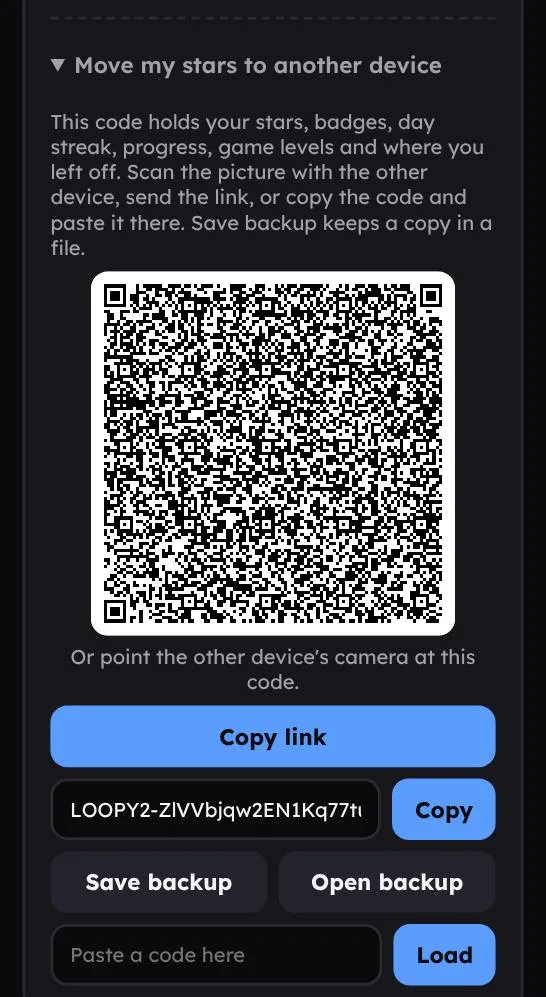
There is no account, so stars move with a code. The code holds the stars and all the progress. You can scan it, send it as a link, or copy it.
Make the code
Section titled “Make the code”- On the home page, scroll down to My stars.
- Open Move my stars to another device.
- With two or more children, pick Everyone or one child under “Whose stars?”.
Move it
Section titled “Move it”Pick one way:
- Scan: point the other device’s camera at the QR code. It opens loopy there.
- Send: share the link with WhatsApp, AirDrop or mail. This button shows only where the browser has a share sheet.
- Copy link: copy the link and open it on the other device.
- Copy the code: tap Copy. On the other device, open the same box, paste the code into the field A code from another device and tap Load. The field above it, Your stars code, holds this device’s code.
A link asks first: “Load Mia’s stars here?”. Tap Load, or Not now.
The link holds the stars after the #. That part of a link never reaches the website, so nothing is sent anywhere. The QR code is drawn on your device too.
What moves
Section titled “What moves”Stars, badges, best scores, the day streak, the Last 5 dots, the age, the game levels and settings, the answers on the grown-ups page, the Try again list, and the last game played, so Carry on works there too. The children’s names and pictures move as well.
A QR code can only hold so much. When there is a lot of progress, the QR code first leaves out the list of wrong answers. When that is still too much, it keeps only the stars, badges, day streak, age, game levels and settings, and the last game. The line under the QR code says what it holds. With very many children and settings there is no picture, and the line says so. Send and Copy link always carry everything.
Loading only adds
Section titled “Loading only adds”Loading a code never takes anything away. The bigger number wins, and loading the same code twice counts nothing twice. Color, font, sound and language are only taken when the other device has not picked one yet.
Each child goes to the child with the same name, or is added as a new child. On a new device, the first child takes the place of the empty one.
What does not move
Section titled “What does not move”The code is a copy, not a live link. Stars earned later on one device do not show up on the other by themselves. Move them again when you need to. Old codes from before still load, but they only carry stars and best scores.
To keep the code in a file, see Backup file.