
Settings in a game
Tap ⚙ Settings at the top of a game. Pick your level, colors and sound.
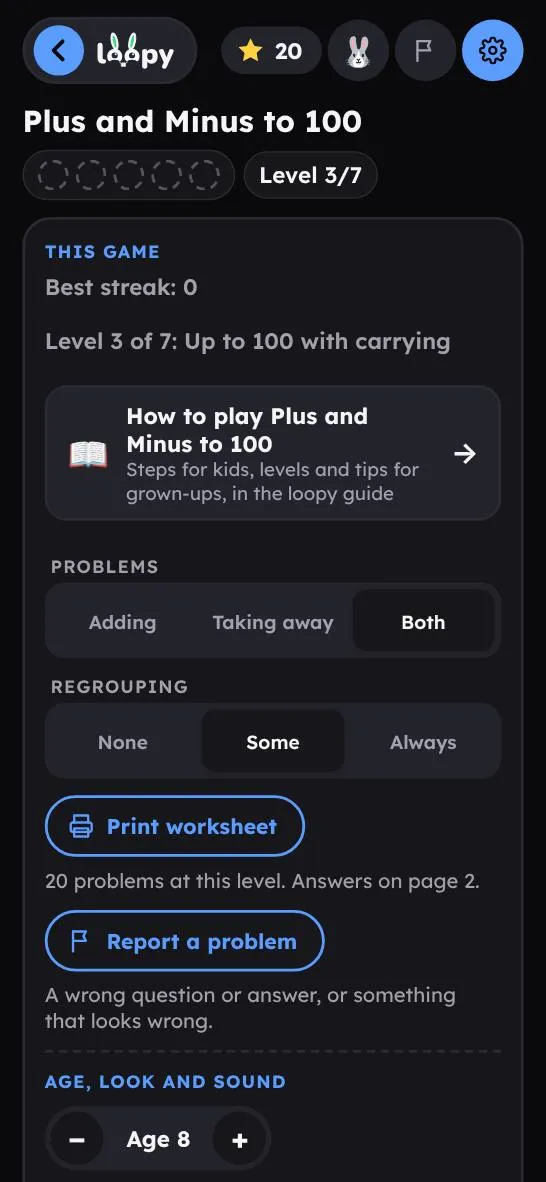
Every game has the ⚙ Settings button at the top right. On a small phone only the gear shows. Tap it to open the box, and tap it again (or press Escape) to close it. The box looks the same in every game.
This game
Section titled “This game”The top part is about this game only.
- Best streak: the most right answers in a row in this game.
- Level: the level the child is on, in the words of the level pill in the score row. For example “Level 3 of 6: Up to 1,000”. The rows below may call it Numbers, Word length or Problems. This line says which one the pill means.
- How to play: opens this game’s page in the guide, in your language. It has the steps for kids, the levels and tips for grown-ups.
- The game’s own choices, like Level, the kind of problems, or a mode. A level you pick is kept for this age and this child. See Levels.
- Print worksheet: 20 problems at this level, with the answers on page 2. See Practice sheet.
- Report a problem: for a wrong question or answer, or something that looks wrong. See Report a problem.
Age, look and sound
Section titled “Age, look and sound”The same row as on the home page: Age, the color themes, Easier to read, the sound button and EN / DE. See Settings on the home page.
This row also has Read aloud. When it is on, a speaker button sits next to the question, and each new question is read out with the device’s own voice. It is on by itself for ages 5 to 7 and off from age 8. It only reads while the sound is on. It shows only when the device has a voice. Sound Spell, Word Match and Spell It do not have it, because they say their words as part of the game.
Reset score
Section titled “Reset score”At the bottom is Reset score. It sets this game’s score, streak and Last 5 dots back to zero. Stars and badges stay. Next to it is a short line about the keyboard.
Today’s 10 is a bit different. It has no “This game” part, and Start again in place of Reset score.
Games with their own modes
Section titled “Games with their own modes”Some games have more choices. A few examples:
- Plus and Minus: Problems (adding, taking away or both) and Regrouping.
- Times Tables Sprint: the Tables to practise, and Calm mode: no timer.
- Box Multiplication: Steps or Quick.
- Step by Step: Mode, Way and Split first.
- Coins and Change: Money in euros, pounds or dollars.
- Word Match: Words in, Topic and Choices.
Each game’s page in this guide lists all of its settings.